Fun with Oracle Database Common User in Multitenant Databases for Backup and Recovery

Why granting rights/privileges right is absolutely important!

Backup, restore/recover and security are always among the most important topics for a database administrator. Data must be kept secure and it is critical that the data can be made available to the business again if something happens - be it with the server, an applicative data loss or e.g. due to a security issue like a ransomware attack. 

To improve security (and the least privilege principle) for backups, Oracle introduced new privileges and users a few years ago. For backup and recovery operations, "SYSBACKUP" has been added. "SYSBACKUP" is available as a predefined user and as a predefined collection of roles and privileges which can be granted to a previously created user. 

SYSBACKUP predefined User


But does it make sense to use a user whose name, for example, a hacker, really knows as it is standard? Wouldn't it be better to have a separate user to whom we grant the SysBackup privilege? It is really easy to do,  therefore let us connect to a 19c database to the root container and create a new user. We name this user c##backup_problem and give him a password. Then we grant this user the SysBackup privilege.

Create common user, grant SYSBACKUP rights


Two simple commands and we have created our user and granted the necessary privilege. This user doesn't need a tablespace quota or any other privileges/roles, so we'll not grant him anything in addition.
Now let's try to perform a backup and use the Recovery Manager to do it. To connect, it is important to explicitly specify the phrase "as sysbackup" for this user. This is not implicitly set (like you are used with sys, where "as sysdba" is done in the background).

Connect "as sysbackup" to RMAN target database


Now it should be easy to back up the database with all its containers (in my example these are: CDB$ROOT, PDB$SEED and PDB19_1). 

Backup as common user


As you can easily see from the screenshot - this worked. With that, I think/do you think, we are done, our user works flawlessly?

Let's do a simple test. We simulate the loss of a datafile in our pluggable database PDB19_1 and simply delete a datafile.

remove datafiles for users tablespace of the pdb

To reproduce the error without any time loss, we restart the database and see our PDB19_1 is now just mounted. When we try to open it, we get an error message (ORA-01157 / ORA-01110). This is the behaviour we want to see.

ora-01110 and ora-01157 for deleted datafile


Luckily, we do have created a backup and we know the advantages of Data Recovery Advisor (DRA) to restore and recover the Oracle database. We can use it very quick and the DRA easily restores the (missing parts of the) database and the users can continue working on the applications. We just need to log in as c##backup_problem user and we can use "List failure;", "Advise failure;" and "Repair failure;" in the Recovery Manager. So let's start the Recovery Manager and see what happens with List failure and Advise failure.
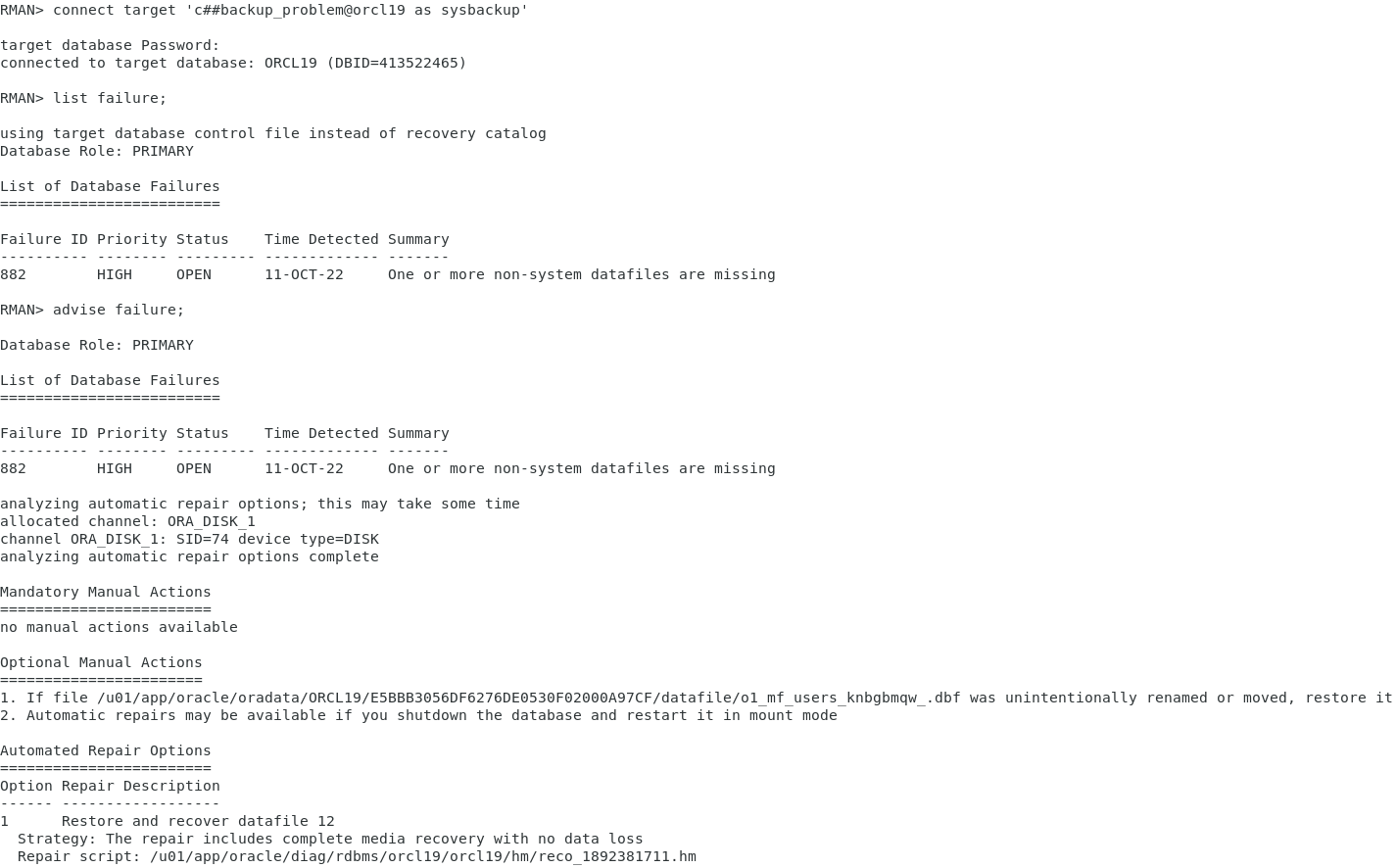
List failure and advise failure in rman


Everything is like it should be, the DRA tells us, "the repair includes complete media recovery with no data loss". Perfect, that's what we need. Let us repair the failure now by running "repair failure;".

repair failure in rman throws ora-01031: insufficient privileges


Oops, it does run only parts of a seconds and we did not expect this: An "ORA-01031: insufficient privileges" on the "alter session set container" command? But we have created a common user and granted the SYSBACKUP privilege? How can this happen?


First, let's take a look at the repair script that the DRA wants to run to restore and recover the database.

the repair script


As you can easily see, the Data Recovery Advisor wants to offline the deleted datafile in the pluggable database, restore and recover it and then bring it back online. Implicitly there is an "alter session set container" for both SQLs and exactly this fails. What can we do in a situation like this? Sure, you can log on to the database as “SYS” or "/", but the DBA who takes care of the backups might not have the right to do so and it might take hours to get the passwords from the colleagues. 

That's why we'd rather not let it come to such a situation in the first place. 

We need to find out where this error comes from and how to prevent it from being raised. As described before, the c##backup_problem seems to lack some user rights for the PDB. However, we have granted the SYSBACKUP privilege like it is found anywhere (documentation, support.oracle.com, other blogs), but it seems to be missing in the PDB.

Both, the documentation and the support (the only note that suggests sysbackup grants is Oracle Support Document 2140670.1 (How to take RMAN Full DB backup using SYSBACKUP )) are not helpful for our problem. Maybe we create a new user and grant it the SysBackup privileges again? This time, however, with "container=all" clause?

create common user, grant SYSBACKUP container=all


Again, we connect to our database with using rman and the fresh user as sysbackup in the same way as we did as it failed and run the Data Recovery Advisor again. (I skip the output of the list failure and advise failure, that works anyway). 

Restore and Recover with DRA and common user


Hooray! The datafile has been restored and recovered - we should be able to open the PDB19_1 for the application again. 

open pluggable database


So it is certain what before was only a guess: the missing "container=all" clause is responsible for the missing grant of the SYSBACKUP privilege to the user c##backup_problem in our PDB19_1. 

Lessons learned? 

As always, half the work is not all the work. If we didn't tried to restore the datafile (or maybe if we tested only a restore of the CDB datafiles) we would never ever have noticed the error. The backup using the root container worked without any problems. But is it possible to test all scenarios for all databases and containers if you grant such privileges? Of course, NO! 

And you should not trust the documentation, neither at oracle (including oracle support notes), nor at mostly any other blog (maybe mine if you test it). Most of them just tell you to grant the SYSBACKUP privilege (without the container=all clause). This is part of the learning process handling a multitenant database!

However, if you do get from any colleague a common user with a SYSBACKUP (or any other SYS* privilege) you should test it carefully. For SYSBACKUP e.g. there is a small test case. You can simply open or close the pdb(s) using rman. If the attempt fails with "insufficient privileges" the user was not granted the SYSBACKUP privilege for all containers. 

test to open pdb in rman throws ora-01031: insufficient privileges


Why container=all does not revoke the privileges from all containers? Find the answer at the second blog post regarding common users in oracle databases.

Sync PDB failed with ORA-40365 while performing 'alter user sys account lock password expire' - How to get rid of it.

As so often, a customer was asking for the solution of an error they have seen at the database. After creating a new Oracle 19c database with a fresh PDB in it, they found the error "Sync PDB failed with ORA-40365 while performing 'alter user sys account lock password expire'" in the view PDB_PLUG_IN_VIOLATIONS.

The Oracle Support Note "Sync PDB failed with ORA-40365 while performing 'alter user sys' (Doc ID 2777162.1)" told him that this error can happen when upgrading a database to a newer version.

Doc ID 2777162.1

You know how it is. Things that go differently than they are described demand analysis and don't give you a moment's peace. So I started to recreate the whole thing...

While the customer is working with version 19.8, I installed version 19.13 on my MS Windows laptop and created a new database there with the DBCA. I was (not) surprised when I saw the error on my end as well.

This means that something fundamentally different is going on here than what was described at Oracle Support. 

Log me, find me, SR me

Well - this error shouldn't happen if you create a new database, isn't it? So first I checked the version of the password file on my laptop for the new created CDB. This can be done with "orapwd" and the parameter describe.

Hm, the password file was created with version 12. But the support note told us, that a fresh created CDB should have password file format 12.2 - if not, we can upgrade the file manually to 12.2 using orapwd (more to come later in this blog post). 

So it looks like the DBCA is creating the wrong password file version in some way. But can this be? Maybe it depends on the password complexity? No, also another attempt with a very complex password ended with the same password file version: 12. 

Well, if the DBCA is doing it wrong, maybe it's recorded in the log file of the creation? And yes, it is.
 
 
As you can see at the highlighted line, the DBCA actually creates the password file fix with version 12 - instead of the version 12.2 we expected.
 
In my opinion, this is a bug - so I opened a service request with Oracle about it.
 
Long story short: This isn't a bug. At least not a bug at the DBCA. It is a bug at the documentation resp. the support note. Based on communication with Oracle Support, a new note has now been created:

Oracle Support Document 2663482.1 (19c DB Does Not Make Password File Default Format As 12.2)

can be found at: https://support.oracle.com/epmos/faces/DocumentDisplay?id=2663482.1
This new note now tells us, that we need to pass "-skipPasswordComplexityCheck false" to the DBCA (one has to ensure, that the password set is passing the password complexity function) to get a 12.2 password file. Also, an enhancement request was created to make the 12.2 password file version as the default one when creating a 19c database.
In the original support note (Doc ID 2777162.1), Oracle also has changed things now. First is, they have put in that his can also happen with a newly created database. Also they tell us, why they haven't changed the behavior. This is mainly because, in addition to password complexity, things like "Password Lifetime" for SYSDBA, SYSBACKUP,... users are turned on with password file version 12.2.
So it should be exciting to see if the behavior will then change fundamentally in a newer database version or if will remain as default 12.

How to get rid of it

Well, first step is to recreate your password file with version 12.2 - you use orapwd with a input file and the version you want the new file created as I did: 
 
Don't forget to rename the fresh created file that it has the same filename as the original one had (and check all topics that a change of the password file version does influence). Afterwards, you can fix the error in PDB_PLUG_IN_VIOLATIONS.
I tried to re-open the PDB as well as using "exec dbms_pdb.sync_pdb" - but the error never was set to resolved - it stayed in PENDING state and I weren't able to use "exec dbms_pdb.clear_plugin_violations".

To have the entry removed, I needed to do something I really DON'T like to do - to delete manually from the data dictionary with a "delete from pdb_plug_in_violations where error=40365;"  statement. Be aware that changing things at the Data Dictionary manually can cause a lot of trouble - you should only do it, if you have a sufficient backup and you are sure you do the right thing.


Deinstallation of 19c Database Home with 19.11 and 19.12 error: oracle/rat/tfa/util/ManageTFA

Oracle likes you to run Oracle databases on your servers. This is maybe the reason, why you can't uninstall Oracle database version 19.11 (and 19.12) anymore. 

No, obviously, this isn't the reason, I personally do think it is a bug. 

We hit this bug at a customers environment who was upgrading a test database from 19.11 to 19.12 on his Linux server by migrating it into a new 19.12 Oracle software home. After that he wanted to uninstall the existing 19.11 Oracle database home. 

He went to /u01/app/oracle/product/19.11.0/dbhome_1/deinstall and started the deinstallation by running ./deinstall.sh.

When the deinstallation procedure has started, it soon has hit an error:

ERROR: oracle/rat/tfa/util/ManageTfa
Exited from program. 

We then thought we can detach the Oracle Home from the inventory and remove the folder manually aftwerwards. Therefore we tried to use

./runInstaller -silent -detachHome ORACLE_HOME=$ORACLE_HOME

to remove the home from the inventory. Unfortunately, we got another error. As we were a little bit under time pressure, we decided to rollback the 19.11 RU from the Oracle Home and try to deinstall the software again. This worked without any error. 

If you hit this bug and you want to uninstall the home, just rollback the 19.11 or 19.12 RU with opatch:

- change the location to the OPatch folder and run opatch with lsinventory to see the installed patches:

cd $ORACLE_HOME/OPatch
./opatch lsinventory

The output will look like:

Unique Patch ID: 24175065
Patch description: “Database Release Update : 19.11.0.0.210420 (32545013)

To rollback the 19.11 datbase Release Update you need to run opatch with the id of the patch. The id is marked at the upper output with the green background. Don't use the Unique Patch ID, it's a different ID and the rollback will not work (I just add this because 99% of the DBAs never needed to uninstall a patch 😇). 

$ORACLE_HOME/OPatch/opatch rollback -id 32545013

 After the RU is successfully removed, just start ./deinstall.sh again - it will work like designed. 

I don't know if this bug also hits other operating systems like AIX, Solaris or MS Windows. If you got this error there, it would be nice to leave a comment. As 19.13 isn't released yet, I don' know, if this bug exists there also.